
I’m a little behind and this is only my second Writing Wednesday when I know, based on the calendar ,that there were a ton of Wednesdays in between. So for today’s post I thought that I’d talk about this really wonderful novel writing app that I found. Wavemaker. It’s got a lot of ways to organize your novel writing experience.
This isn’t sponsored, I just found it and thought that I’d share. I know that it’s not necessary to writing a great book but sometimes it’s nice to have a way to organize by scene your book and have it exported all together. In finding this program, I found a lot of features that were really nice and the best part is that it’s 100% free! So let’s dive in…
Wavemaker is a progressive web app that saves locally to your computer or chromebook. You can have multiple projects at a time and there are preset setups depending on the kind of project you are trying to do.
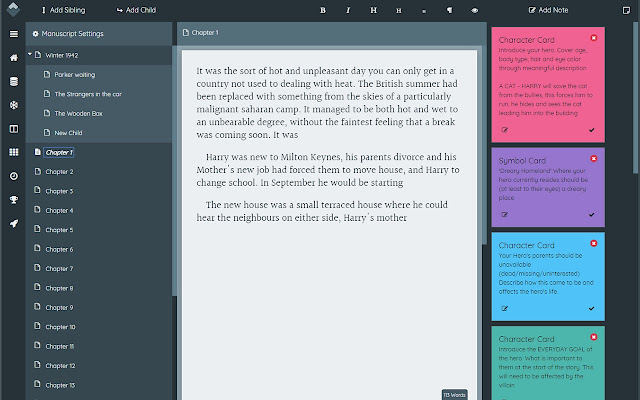
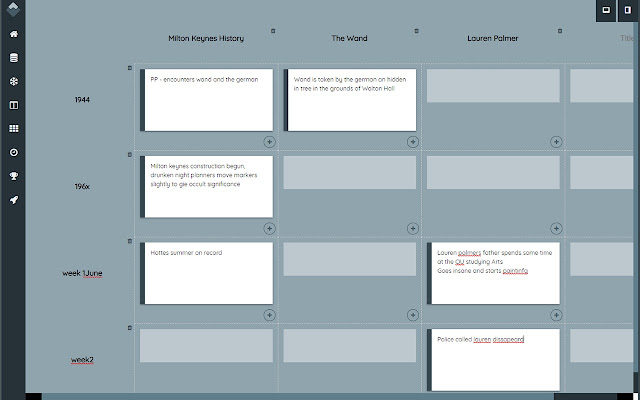
It had cards for organizing plots, characters and more. It has a snowflake tool which I hear is pretty popular though I’ve never used it. It has a timeline tool, which can really help keep your events on track. There’s a planning board, mind maps, and grid planner too. There is a challenge mode to get you writing and you can export to a lot of different document options.
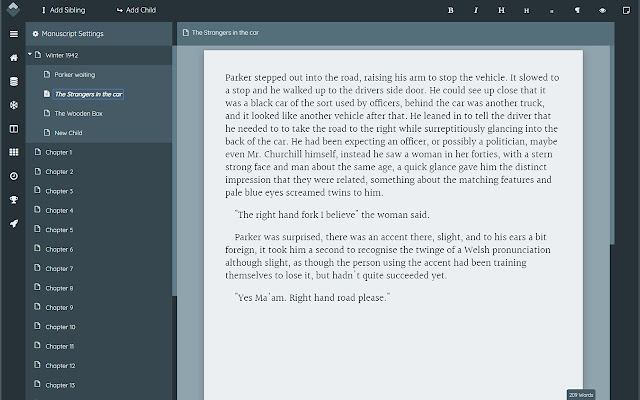
You can have as many chapters as you want and within those chapters you can break things down by scene. I find this helpful because I get lost when I’m going through my google doc file and I’m trying to find where I’m lacking and where I need to add. I can add notes to those scenes that will help me know what I need to change or add later if I want to just write but have something stuck in my brain. That way I don’t have to completely go back but I don’t forget what I was thinking later.
This reminds me of Scrivner a lot. I only got to use that for a little while and I know that I didn’t even touch most of the features but this feels a lot like that to me. It’s a pretty nice option when you have a chromebook and can’t download those PC programs without adding other stuff.
It’s easy to install so that you don’t have to work off the website directly, it’s easy on the eyes and doesn’t look terrible. I think the main thing that I don’t like is that you can’t format the text all that much. It’s barebones in that department. The spacing isn’t what I’d like it to be and you can’t align some of the next only all or nothing.
However I realized that wasn’t all that much of an issue because I can export to a word doc, save as a google doc and just reformat it however I’d like. I was able to forgive the lack of options on that front because really at the end that stuff doesn’t matter until you are all done and trying to get your manuscript out there.
This is 100% free which I think is amazing when the market is full of programs that cost a pretty penny to use. Especially when a lot of people, like myself, don’t have the money to pay for that kind of stuff. It has a lot of the features that people look for in this type of program. I would recommend this for anyone that wants to be organized while writing their novel but doesn’t want to have to spend a lot for a program. Or has a device like a chromebook where there aren’t a lot of options.
Become a Patreon or Support via Paypal!!
Do you use a program like this or do you like just writing in a word program and keeping things simple? I’d love to hear your thoughts!


Leave a Reply